

Contents
CyberArk PAM
The CyberArk Privilege Cloud (“PCloud” or “PrivCloud”, in short) is a cloud-hosted, Privileged Access Management (PAM) Security platform that addresses a wide range of use cases to:
- Secure, monitor, and audit privileged credentials and secrets wherever they exist: on-premises, in the cloud, and anywhere in-between
- Provide secure, proxied access to Target systems with optional Session Recording for auditing and forensics
Privilege Cloud is often used by organizations simply as a central password management system, though that only scratches the surface of what the platform is capable of.
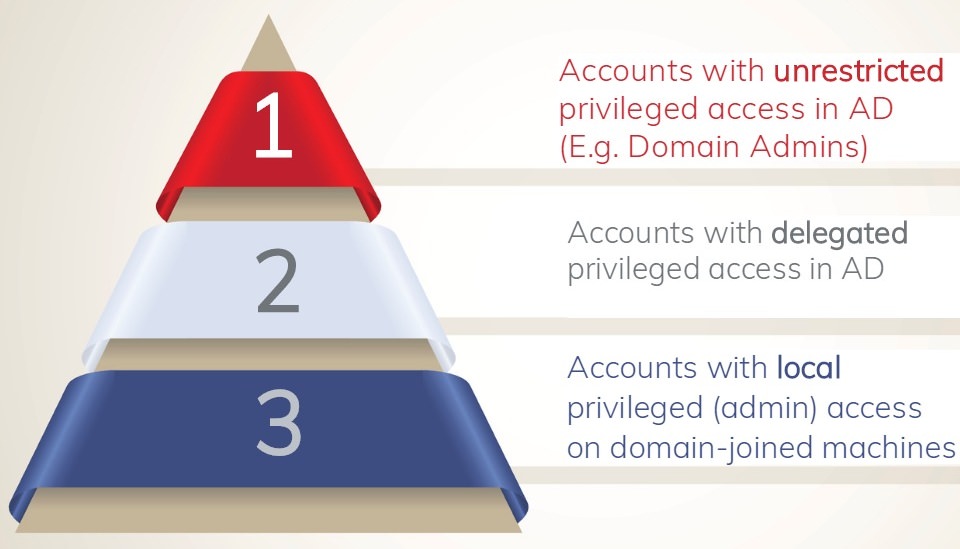
Tiered Windows Admin Levels /ParamountDefenses
This article aims to give an overview of the many CyberArk components (and acronyms) that make up its PAM platform. It also assumes that the reader has a basic understanding of what PAM is and why a good Identity & Access Management (IAM) program is necessary. This post is not designed to be the most comprehensive resource on the topic nor on the CyberArk security platform, but to provide just enough information to get started.
PAM is used to protect an organization by monitoring, detecting, and preventing unauthorized, privileged access to critical resources. It can do so by separating admin accounts into different layers to restrict their use to their specific tier, thus preventing compromise of other layers.
If you are new to IAM and/or PAM, feel free to read these articles: Microsoft PAM / ManageEngine PAM.
Overview
CyberArk PAM (via Privilege Cloud and a suite of other components) allows organizations to continuously discover and manage privileged accounts and credentials, record and monitor privileged sessions, and remediate risky activities across on-premises, cloud, and hybrid environments. It additionally enables Least Privilege access on both Windows and *NIX servers, including the detection and mitigation of threats on highly-prized Active Directory Domain Controllers.
Session Recording, a feature of CyberArk PAM, is generally intended to be used for audits, forensics, and root cause analysis.
PCloud works in conjunction with CyberArk Identity, Microsoft Entra ID (aka Azure Active Directory), Okta, Active Directory, and other identity providers (IdP’s) to manage multi-factor authentication and other parts of the CyberArk platform.
Privilege Cloud is hosted by CyberArk and supporting infrastructure components exist within an organization’s network that proxy connections, handle password rotations, and other aspects.
Capabilities
CyberArk Logo
CyberArk PCloud primarily focuses on (1) managing privileged accounts and (2) brokering connections (proxies) to privileged assets. PAM is done via CyberArk components that connect to Active Directory, cloud admin consoles, servers, workstations, web sites, databases, APIs, and more. It has the capability to manage credentials and broker connections via proxy to a number of different platforms including, but not limited to:
- OS: Windows (Local and Domain Accounts), Linux
- Network Devices: Palo Alto, Cisco, CheckPoint, FortiGate, etc.
- Databases: SQL Server, Oracle, etc.
- Web Sites
- RDP, VNC, SSH
A major benefit of the proxy capability is secure access to a Target resource housed within an isolated network segment without the need for a VPN.
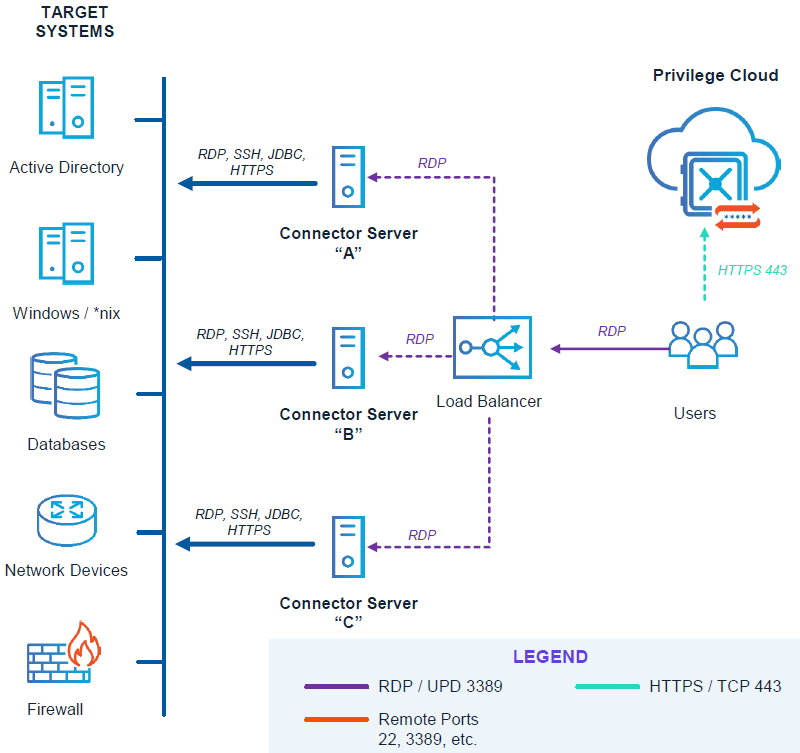
Privilege Cloud and PSM/PSMP “Connector” Servers /CyberArk
Architecture
Below is an example architecture I once rolled out for an employer. Each environment is unique, and as such a “one size fits all” design is difficult to provide. Consider licensing cost, connectivity (bandwidth, latency, high-availability, disaster recovery), security (network segmentation, firewall rules, access control, etc.), target resource locations, logging and governance, administrative overhead, use cases, and so much more into a design.

CyberArk Privilege Cloud Architecture (Generic Sample – YuenX)
CyberArk infrastructure should be placed inside its own, secure network segment away from Target resources whenever possible. They are meant to be highly hardened servers that can only be accessed through the CyberArk platform.
Additional Reference: Privilege Cloud Architecture (CyberArk Docs)
Privileged Account & Password Management
At the heart of CyberArk’s privileged account and password management is the Vault that exists within the Privilege Cloud. An on-prem, self-hosted version is also available, but many organizations are now using the hosted PCloud.
CyberArk Employees do NOT have access to an organization’s Vault without going through DoD-level security controls, according to the company. Further, they cannot access the hosted tenant unless the customer approves it for a set amount of time, such as for technical support purposes.
- CPM – Central Policy Manager
- Windows Server that exists in an organization’s infrastructure. It is responsible for managing (1) policies and (2) passwords, including password verification, rotation, and reconciliation (only for those that exist in the Vault)
- Reconciliation occurs when the password between the Vault and the Target are no longer in sync. CPM uses a privileged Reconcile account to reset the password on the Target
- Platforms are policies that manage the safes and credentials
- CPM will eventually be replaced by SRS – Secrets Rotation Service
- SRS was built from the ground up to be cloud ready, faster, easier to administer, and has native high-availability (HA). Accounts are tied to a SRS connector pool instead of directly to a CPM
- Windows Server that exists in an organization’s infrastructure. It is responsible for managing (1) policies and (2) passwords, including password verification, rotation, and reconciliation (only for those that exist in the Vault)
Only passwords on-boarded onto Privilege Cloud are in scope for management by CyberArk.
Passwords are managed and rotated at a configured frequency with histories (number of records or set days) recorded within the Vault. These credentials are stored within Safes to which only assigned teams, departments, and/or individuals have access.

CPM Server: Password Verification, Rotation, Reconciliation
Credentials can be accessed through multiple methods – protected by MFA – including the PVWA (Password Vault Web Access, the user web interface), API calls, and Connection Strings (RDP, SSH, etc.) for automated logins.
- For highly sensitive credentials, Dual Control, can be implemented that requires one or more approvers before access can be granted
- Users can view, use, and/or manage credentials that they have been given access to
- “Use”: User can connect to the Target (associated with the credential) without ever knowing what the password is. This is potentially useful for third parties use cases
- MFA can be cached so a User only has to multi-factor once per configured period. This is currently only available for SSH sessions
- Caching for RDP is slated to be available through a CA software upgrade sometime in Q2/Q3 of 2025
Proxy Connections
There are multiple ways that CyberArk can securely proxy connections to target destinations, including:
- PSM – Privileged Session Manager
- PSMP – Privileged Session Manager SSH Proxy (aka PSM for SSH)
- SIA – Secure Infrastructure Access (formerly DPA – Dynamic Privileged Access)
- SIA will eventually replace the PSM and PSMP
- HTML5 Gateway
- SWS – Secure Web Sessions
- Vendor PAM
Here are the details for each component.
PSM and PSMP

PSM/PSMP Servers: Proxied Connection to Targets
- PSM and PSMP will eventually be replaced by SIA
- PSM (Privileged Session Management)
- Windows Servers that act as “jump boxes” between the User and the Target
- RDS Terminal Server Licensing is required for this to work and best used in an Active Directory environment. Generally, User CALs are most cost-effective for this configuration
- Users launch sessions through the PSM via tcp/3389 (RDP)
- Unlike the PSMP, this server is extensible and more capable. Connection Components can be built for custom use cases not available with the standard deployment. This can include:
- RDP, VNC, SSH
- Web Session (ie. Corporate LinkedIn and social media, Azure Portal, VMware vSphere)
- Fat Clients (ie. ADUC, Visio, Network Video Recorders)
- Windows Servers that act as “jump boxes” between the User and the Target
- PSMP (aka PSM for SSH, PSM SSH Proxy)
- Linux Servers that act as “jump boxes” between the User and the Target via SSH only
- Linux-native SSH support for faster, more efficient connections than using a Windows PSM with its SSH client
- Unlike PSM RDP sessions, PSMP supports SSH MFA Key Caching
- CyberArk is scheduled to release MFA Key Caching for RDP sessions sometime in Q2/Q3 of 2025
- Linux Servers that act as “jump boxes” between the User and the Target via SSH only
SIA
- SIA – Secure Infrastructure Access (formerly DPA – Dynamic Privileged Access)
- This newer technology was built from the ground up to be cloud ready and potentially replace PSM/PSMP
- Easier to use, manage, monitor, and troubleshoot and has built-in high availability and load balancing. Its Connector component is lightweight
- Users launch sessions from CA Privilege Cloud which in turn creates a reverse SSH tunnel to SIA
- Built-in support for
- RDP, SSH
- Kubernetes
- Databases (SQL Server, oracle, Db2, MongoDB, MySQL/MariaDB, PostgresSQL)
- DB clients, instead of checking out credentials the way PSM required, can natively connect to the database using the PCloud credential – complete with MFA key caching
- Zero Standing Privilege (ZSP) access to Targets via the creation of ephemeral accounts
- ZSP is a security model where users only have access to resources and permissions when they need them, and not permanently
- Note: SIA must be installed on a Windows, not Linux, host for ZSP to be used with RDP sessions
- “Ephemeral”: A temporary account created to exist for a limited time to perform a specific task. Upon its conclusion, the account is removed from the Target system so an attacker has no credential to compromise against
- Easier to use, manage, monitor, and troubleshoot and has built-in high availability and load balancing. Its Connector component is lightweight
- Traditional Vaulted accounts can still be used the same way that PSM/PSMP do
While PSM/PSMP is more fully featured as of April 2025, SIA can be used in parallel until it one day surpasses PSM/PSMP capabilities
SIA Use Cases
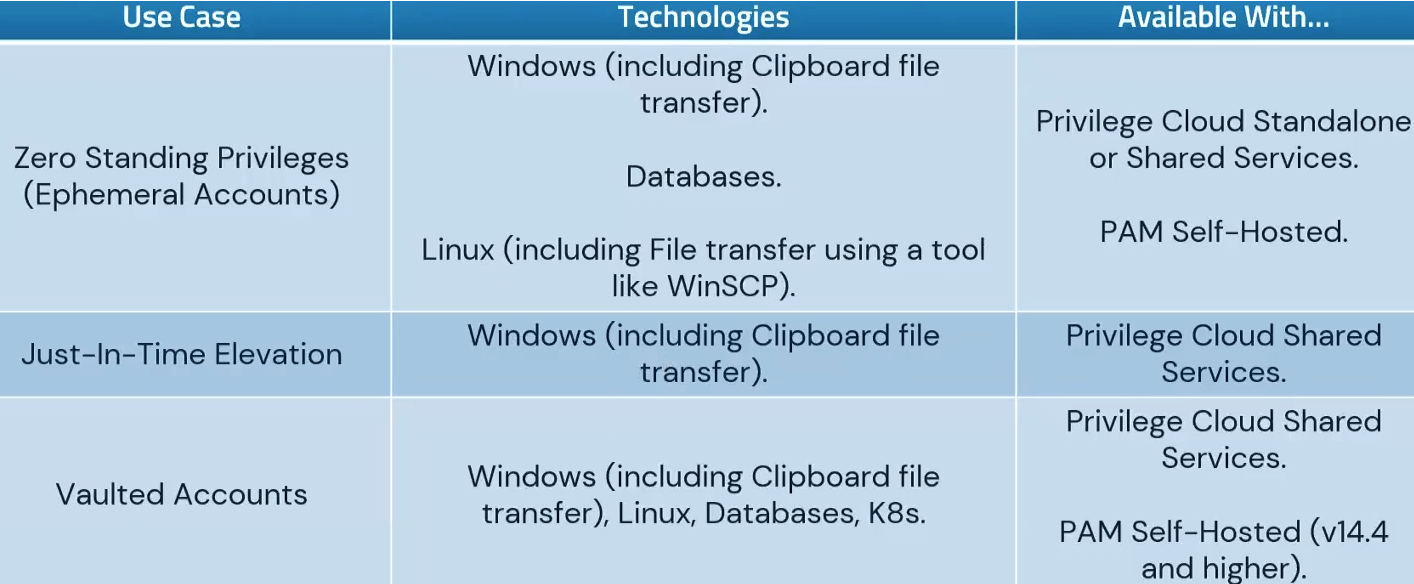
SIA Use Cases /CyberArk
HTML5 Gateway
- A feature of the PCloud PVWA and PSM, it allows a user to use any HTML5-capable browser to connect to a Target system they have access to, complete with Session Recording
- SIA has this functionality built in
SWS
- Secure Web Sessions – works with CyberArk SCA (Secure Cloud Access)
- SCA provides native access to cloud consoles and CLI with ZSP.
- Azure, AWS, and GCP are supported. CyberArk is aware that Oracle support has been requested by many customers
- SCA provides native access to cloud consoles and CLI with ZSP.
- SWS is used to grant ephemeral access to web pages without using a PSM or SIA proxy
- “Ephemeral”: A temporary account created to exist for a limited time to perform a specific task. Upon its conclusion, the account is removed from the Target system so an attacker has no credential to compromise against
- Provides for secure, direct connection to web pages from the user’s browser, complete with Session Recording
- Use cases could include Corporate social media accounts, such as LinkedIn, Facebook, Instagram
- Provides true, Just-In-Time (JIT) access for cases falling outside of normal policies, such as off-hour access
- JIT is limited-time access to resources only as needed
- Approval can be via email, MS Teams, ServiceNow, Slack, etc.
Vendor PAM
- Also known as Remote Access, Vendor PAM is a feature added to the CyberArk platform through its acquisition of Alero
- Provides Zero Trust access to remote workers, such as third parties and vendors
- Requires biometric support for authentication (ie. face, thumbprint), although less secure SMS is supported too
- Once authenticated, user is directed to the CyberArk services they have been granted access to (ie. PCloud, SIA, PSM), such as RDP, SSH, database, HTTPS, etc.
- Access to assigned applications can be locked to approved Source IPs to minimize the risk of a compromised vendor’s credential or MFA to be used from an unknown location
- Vendor PAM should be used with SIA (instead of PSM/PSMP) because of its built-in support for HTML5 Gateway, negating the need for VPN
Disaster Recovery

Break Glass in Emergency /pngtree
CyberArk Privilege Cloud manages valuable credentials that are needed to make an organization’s environment work. It acts as a primary gateway into many critical assets. Given this, PCloud must be robust enough to handle failures and disaster scenarios. As the Identity & Access Management — IAM, which includes PAM (Privileged Access Management), PIM (Privileged Identity Management), IGA (Identity Governance & Administration) — program grows, so will an organization’s ability to manage issues that may arise that could hinder one from accessing the stored credentials. Many fail safes should be put in place, including periodic offline storage of break-glass accounts in secure locations with Dual Controls, as PAM is being built and the program is matured.
Break Glass
In some scenarios, there may be a need for someone in IT to retrieve a set of credentials for critical systems when other, standard access methods fail or relevant IT administrators are unreachable. These exceptional cases are referred to as Break Glass scenarios where a temporary method for extending a person’s access rights is required to keep a critical system functioning. Some credentials are highly privileged and may require Dual Control (approval from multiple persons) to access them.
Break Glass credential retrieval should only be used as a last resort for keeping the business or critical system function operational.
Summary
The CyberArk platform is vast, comprehensive, and can be daunting to implement. Programs often take several years to mature — from discovery, design and architecture, implementation, support, and beyond — because it touches so many areas of an organization’s technical infrastructure, policies, and processes (both technical and non-technical). However, Identity and Access Management (IAM) is one of the highest areas a Cybersecurity program should focus on because one compromise of a credential can lead to far worse outcomes and resulting public relations and regulatory nightmares.
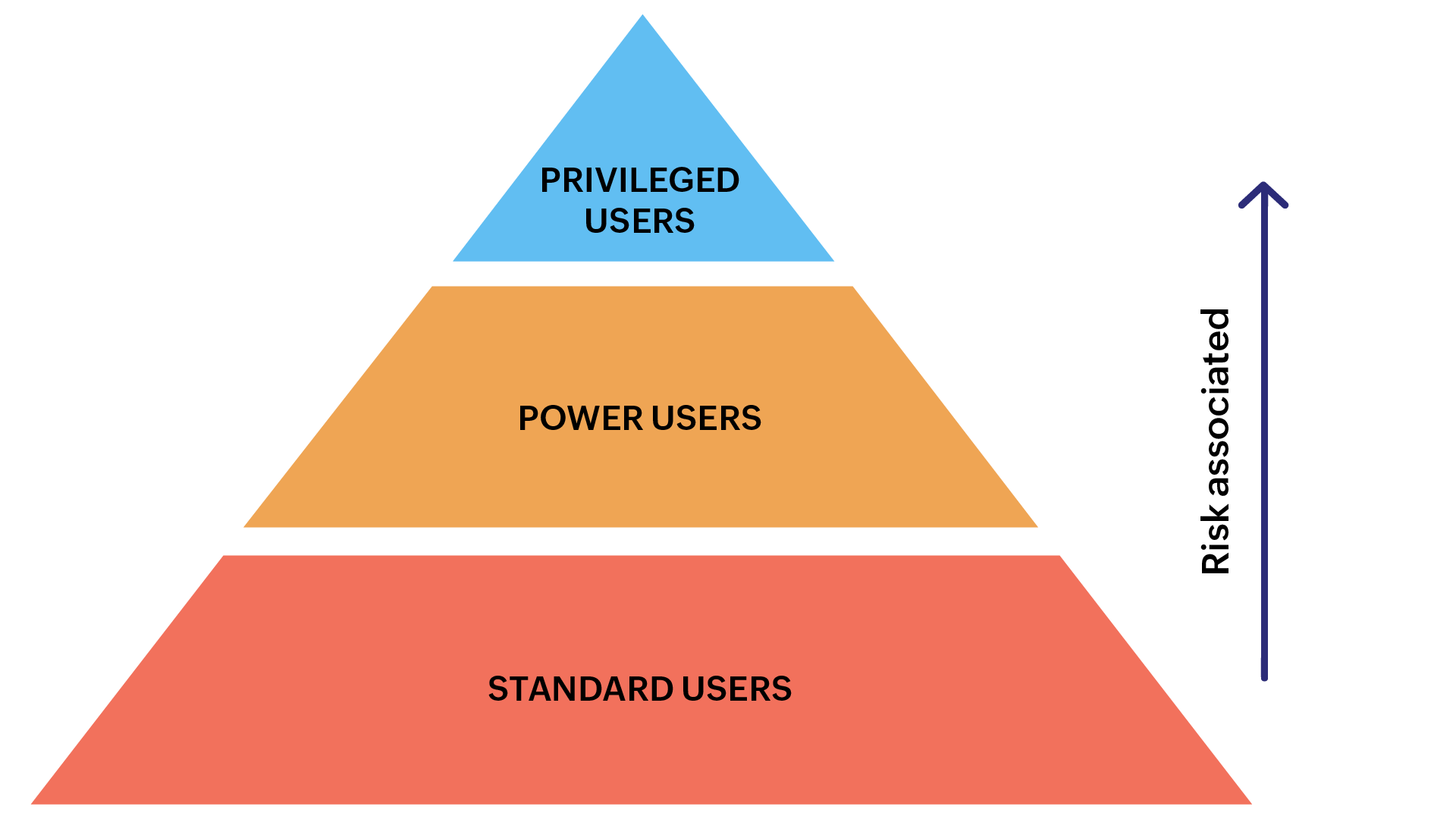
Tiered Privilege Levels /ManageEngine
As previously stated, although this article is quite long, it is impossible to capture everything the CyberArk security platform is capable of. I do hope that it has given you a jump start and overview of what it can do.
A comprehensive PAM, PIM, and IGA program can help minimize the risk of credential compromise and unauthorized privilege escalation, and should a breach occur, the CyberArk platform can help stop or slow down a threat actor’s movement within or outside an organization. I urge anyone looking to use CyberArk to use it beyond just as a simple, central password management system, but to also manage credentials and privileges, and to enforce and monitor connections to target resources. Good luck!
References
Service Status
- CyberArk Privilege Cloud | CyberArk Identity Cloud
Documentation
- CyberArk Privilege Cloud Admin Resource Center
- CyberArk Privilege Cloud Docs
Software & Market Place
- CyberArk Market Place
Related Posts
- Active Directory
- Azure Active Directory
- Audit Role Changes (ie. Global Administrator)
- Successful Logins from Unknown Users
Credits:
– Featured Image by FlyD via Unsplash
